Quick Blurb

Homelab Updates

I recently got some more space to do my homelab endeavors. I am enjoying setting up a proper work bench for soldering, and I got a few racks to put different projects in! I am trying to stay focused on projects and get them done, but there are so many to do!

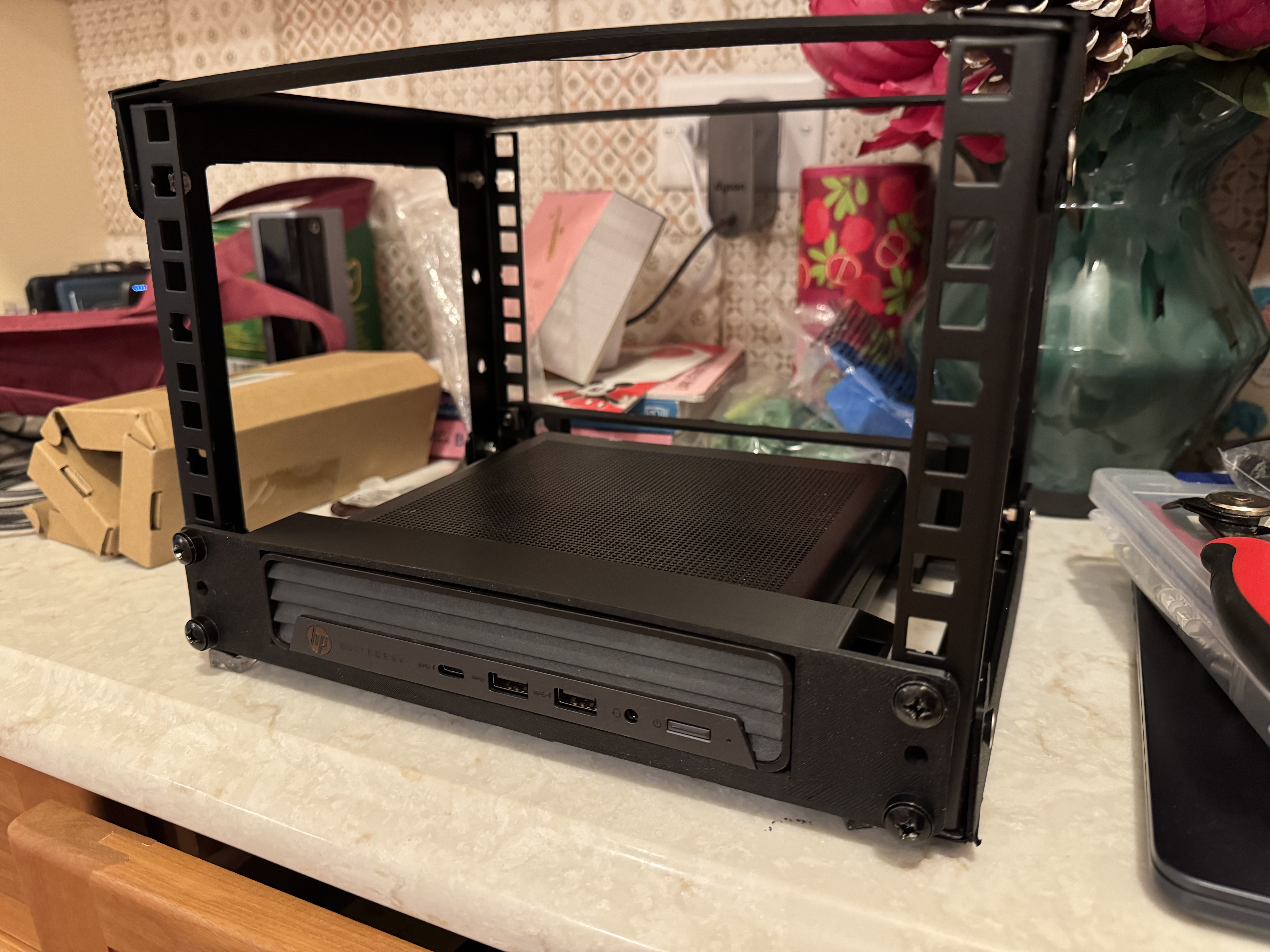
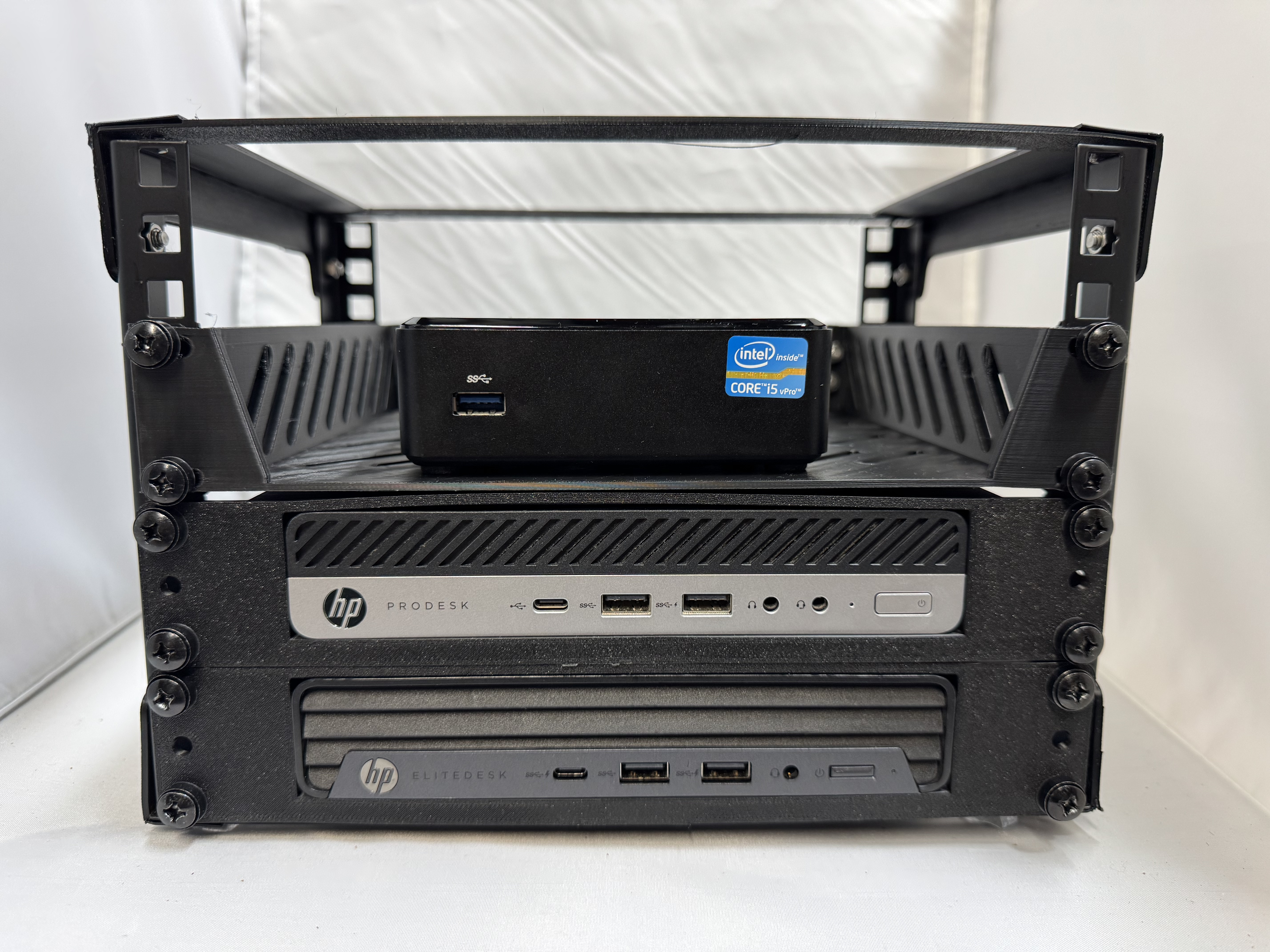
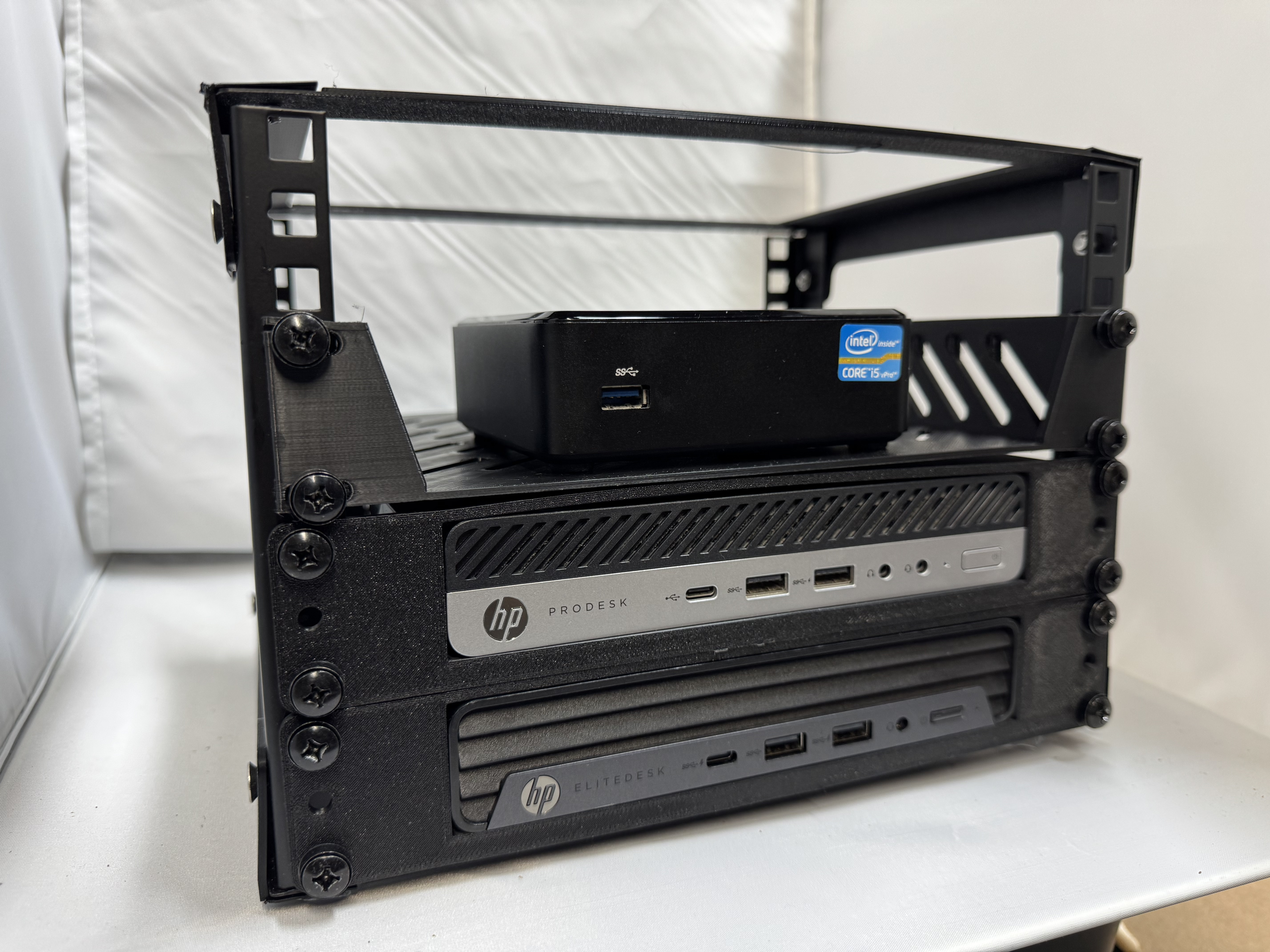
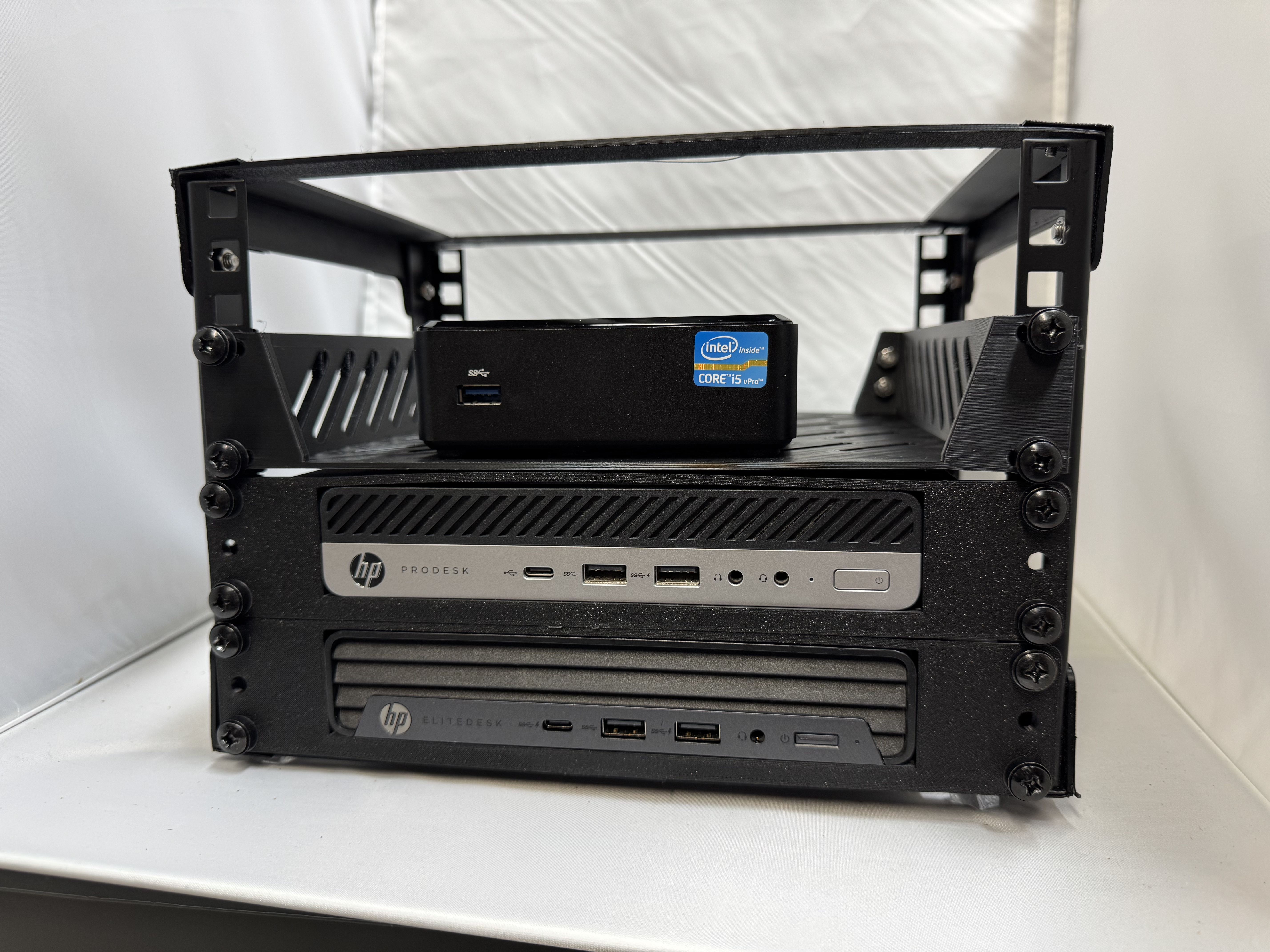
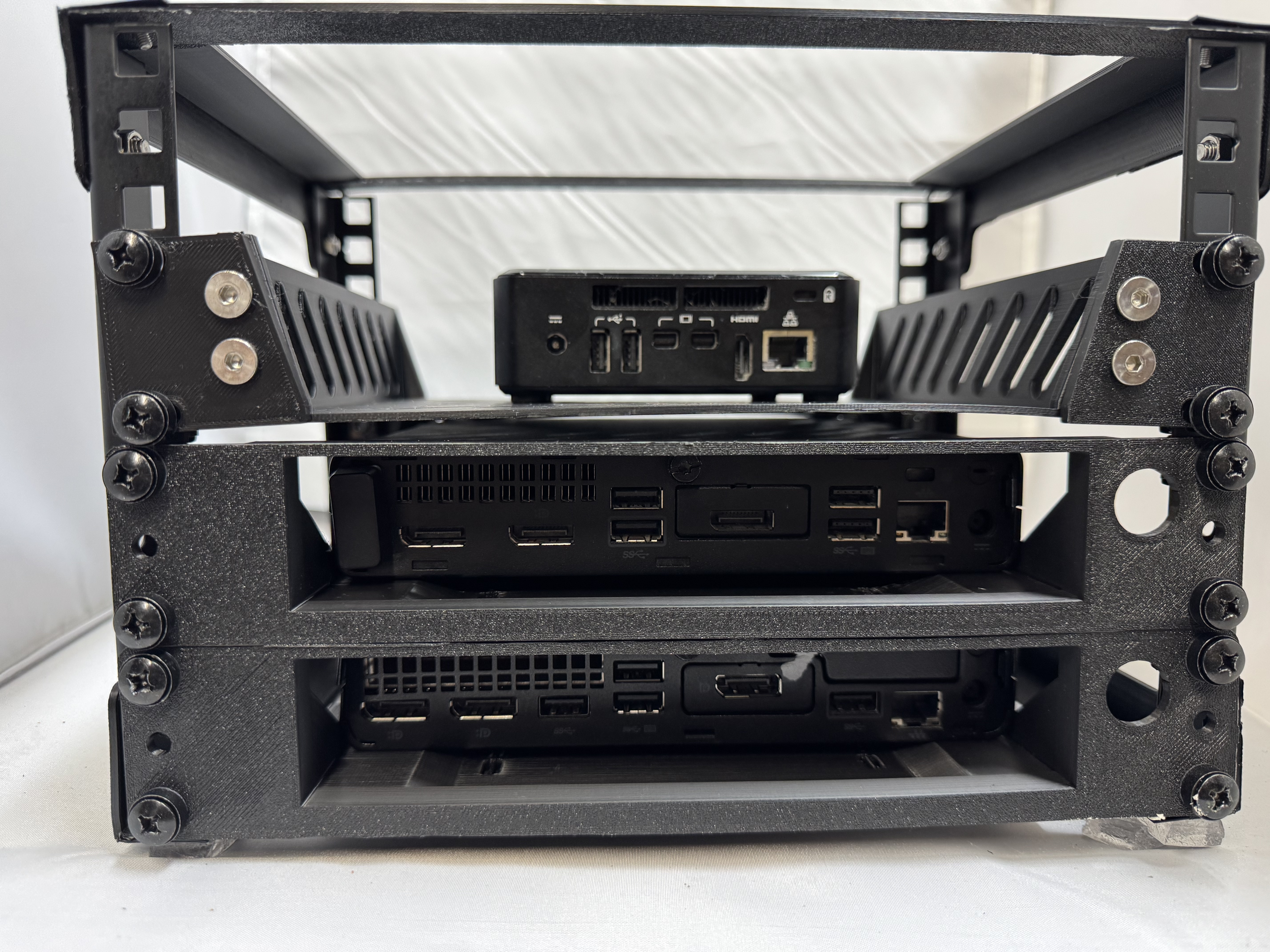
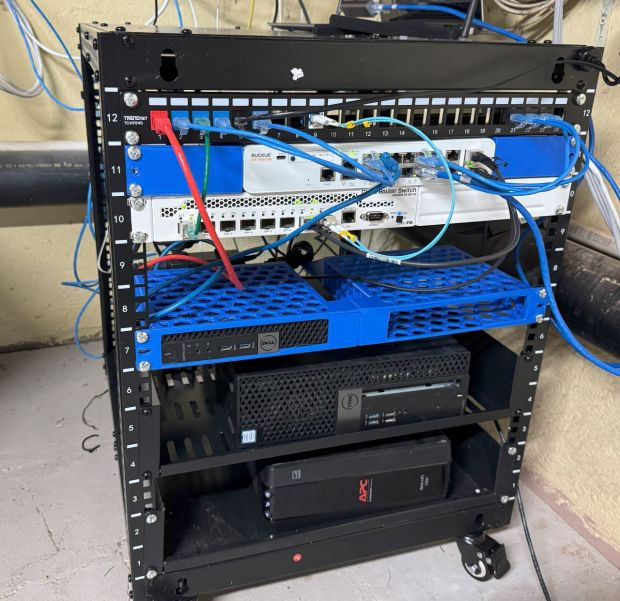
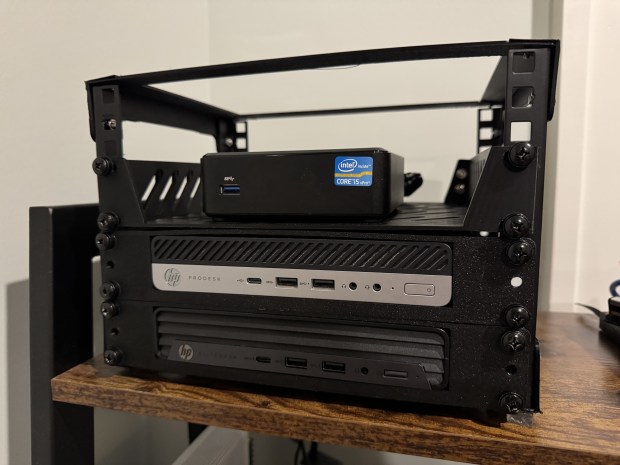
I had our home internet coming in on a little cart and decided it was time to get a small 12U rack, and properly set everything up. The issue is over the years, I acquired switches and gear and not rack ears for them since I wouldn’t need them at the time. I spent the last few weeks working on a few different rack ears for different pieces of gear I have. I also printed this (Dell Micro 1U Rack Mount Remixed by noam_f – MakerWorld) model which allows you to mount Dell Micro computers in 1U. This is nice since my primary domain controller is running on one of those. Someone else made a model of a shelf to hold the power supply (Power Adapter Mount for Dell Micro 1U Rack Mount by Jfrorie | Download free STL model | Printables.com)!

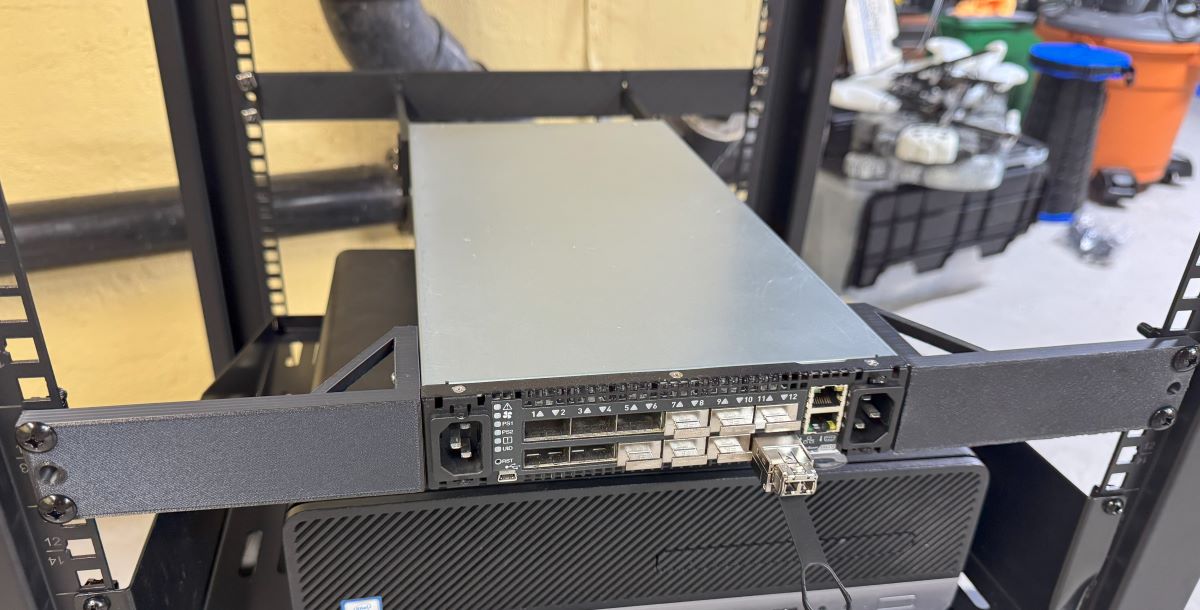
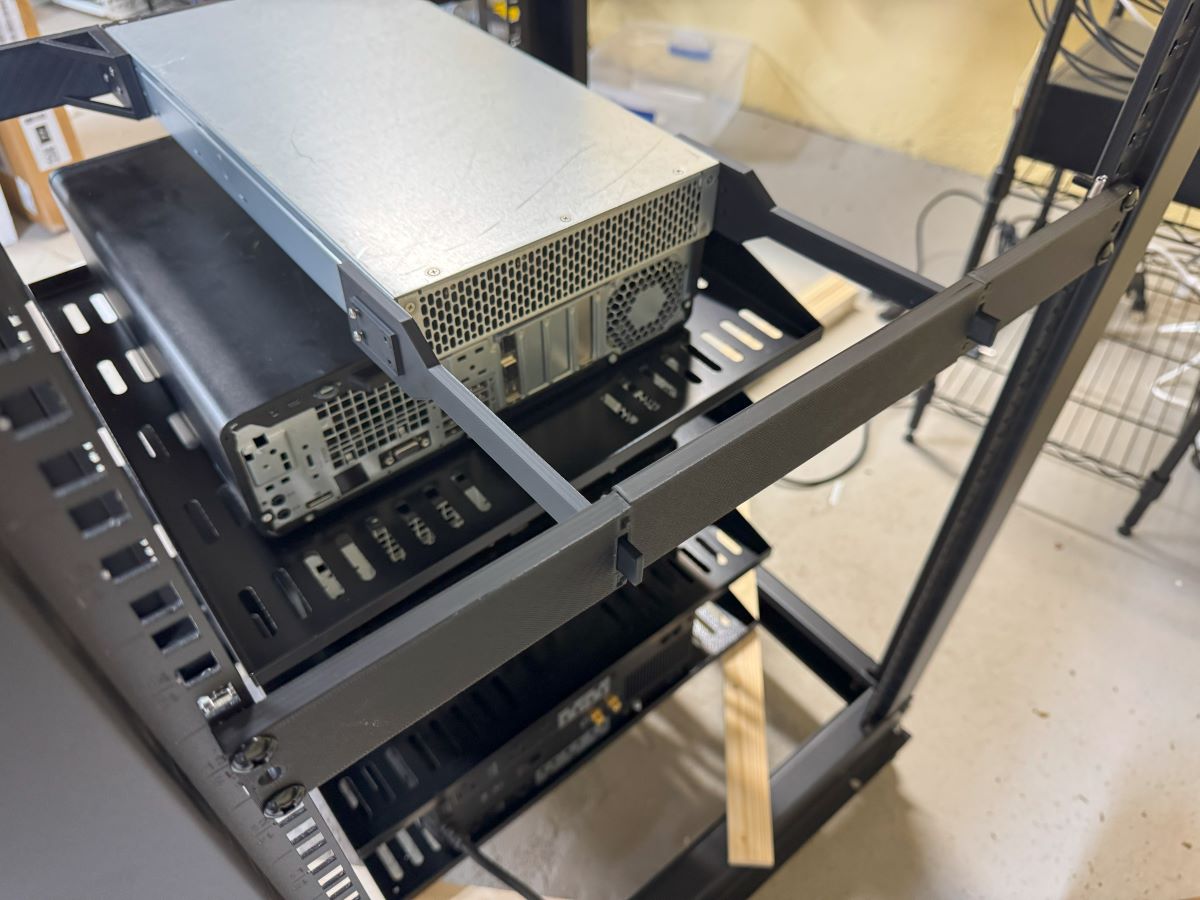
Then it came to my old classics. I needed ears for the Mellanox SX6012 (https://thangs.com/designer/danberk/3d-model/Mellanox%20SX6012%20Ears%20and%20Back%20Support-1308405), and the Ruckus ICX7150-c12p (Ruckus ICX7150-c12p Rack Ears – 3D model by danberk on Thangs). With a little iteration and buying all the sizes of screws the internet has to offer, I got them nicely mounted.

I used metal 2U shelves for the systems I currently have running ESXi. That may be going away soon with all the changes to VMUG licenses. Ill post later more about the state of the racks and network as it progresses.

Ruckus FastIron ICX 8.0.x SSH Issues

I have had two of these little Ruckus ICX7150 switches for years now. They are great little units with 12(ish) 1gb switch ports, and 2 SFP+ cages. My primary one hosts the Wifi APs in my house since the switch is also POE! I have bumped it to its latest recommended firmware on the Ruckus support page, and not had to do much of anything else.

Until recently when I went to SSH into the switch and Windows 11 built in SSH client no longer accepts SHA1 hashes that the switch gives. Or more specifically:

no matching key exchange method found. Their offer: diffie-hellman-group14-sha1,diffie-hellman-group1-sha1

There are two ways of going about fixing this, the first is to tell SSH it is allowed to access less secure clients, adding the following to C:\Users\your_user\.ssh\config does this:

HostKeyAlgorithms = +ssh-rsa
PubkeyAcceptedAlgorithms = +ssh-rsa
KexAlgorithms +diffie-hellman-group1-sha1
ForwardX11 no
ForwardAgent no

This isn’t the best, because we are just lowering generally accepted security practices, but it works.

The next thing I found out is that while 8.0.x is still the recommended release, FastIron 9.0 and 10.0 are out! One of the big recent features of 9.x is much newer crypto standards for SSH. 8.x simply doesn’t have them present.

I upgraded my switch from 8.0.95n to 9.0.10j_cd6; both the switch firmware, not routing. Apparently some releases have a “continual development” release which is smaller than a 0.0.1 release. I haven’t had any issues with the upgrade, it went the same as any other.

A quick note, these days if you attempt to scp it actually uses sftp as the backing protocol, to upload the firmware file to the switch use the following command:

scp -O SPS09010j_cd6ufi.bin dan@192.168.3.1:flash:secondary

Then on the switch:

conf t
boot system flash secondary 
wr mem 
reload

After the switch reloaded, which seemed to take a bit longer than normal with firmware updates, I was right back to my normal working switch and SSH worked happily.

Solidworks Connected 2025 Failed to Install Troubleshooting

I use Solidworks Connected Makers edition to do a lot of my 3D Modeling. I had used Fusion 360 in the past, but they kept changing the license and what file types you could export, so I moved to Solidworks. As many posts from the community say, sometimes it’s like the company is trying to make you mad. Every year or so we get the next update, that you have to do because it’s a web-connected (for no reason) platform; and somehow the install breaks and won’t work. I spent a sometime trying to find all the different bits to delete to get it to install properly and wanted to document it. Once you get Solidworks in working order, it works well. It’s getting it there that is difficult.

I had a failed install, the Solidworks site thought the application was installed, but when I clicked run, I got “failed to launch application, not found”. I uninstalled anything related to Solidworks or Dassault Systemes. Then I found and deleted the following.

Files:

  • C:\Program Files\Dassault Systemes\SOLIDWORKS 3DEXPERIENCE
  • %appdata%\SOLIDWORKS
  • %appdata%\DassaultSystemes
  • C:\ProgramData\DassaultSystemes
  • C:\ProgramData\SOLIDWORKS

Registry:

  • Go to HKEY_LOCAL_MACHINE\SOFTWARE\Microsoft\Windows\CurrentVersion\Installer\UserData
    • Search for “Solidworks”, I found items like \S-1-5-18\Products\0911033B9E8C8E647ABE3D57D2083CB1\InstallProperties, where DisplayName was “Solidworks 2020”, delete anything related to Solidworks at the Products level.
  • Delete “HKEY_LOCAL_MACHINE\SOFTWARE\Dassault Systemes”
  • Delete “HKEY_LOCAL_MACHINE\SOFTWARE\SolidWorks”
  • Delete “HKEY_CURRENT_USER\SOFTWARE\Dassault Systemes”
  • Delete “HKEY_CURRENT_USER\SOFTWARE\SolidWorks”

Even in the best conditions, on a fast machine it will take a LONG time to install, 3+ hours, looking like nothing is happening, I left it overnight. The x MB/y MB installed will not always progress for a while.

Logs in: C:\Program Files\Dassault Systemes\SOLIDWORKS 3DEXPERIENCE\InstallData\log

The install seems to install 4.5 billion MSI files, and then after each runs “.NET Optimization Service”; if your install is progressing, that service should periodically jump in CPU usage. My install halted at 76% 6122MB/14942MB installed for a long time; again, I left it overnight and it managed to finish.

I hope this helps someone. If others have issues or fixes, please leave a comment; maybe together we can get this program to work. In the end, mine worked after being left overnight, and now everything is functioning well with the 2025 release.

Update:

I went to reinstall and got the following errors:

Failed to get msi version for UpgradeCode [{B54313C8-7B46-297F-3AC1-85D9EFD5ECB7}].

Technical details:
The property is unrecognized
Error code: 1608
Invalid data in HKEY_LOCAL_MACHINE\SOFTWARE\Microsoft\Windows\CurrentVersion\Installer\UserData\S-1-5-18\Products\BE85C2B02A76B522062B1D99E055DD33
Action CheckInstalledMsiVersionAction from feature CODE\win_b64\SWXDesktopInsPreqWPT failed.
Action ID: SWXDesktopInsWPTInstalledAction

Failed to get msi version for UpgradeCode [{00F50064-7000-11D3-8CFE-1050048383C9}].

Technical details:
The property is unrecognized
Error code: 1608
Invalid data in HKEY_LOCAL_MACHINE\SOFTWARE\Microsoft\Windows\CurrentVersion\Installer\UserData\S-1-5-18\Products\E5A00A437891E38418011307471668D7
Action CheckInstalledMsiVersionAction from feature CODE\win_b64\SWXDesktopInsPreqVBA71 failed.
Action ID: SWXDesktopInsVBA71InstalledAction

I ended up searching for those hashes in the registry, “BE85C2B02A76B522062B1D99E055DD33“, and “E5A00A437891E38418011307471668D7“. Then deleting registry keys where a sub part mentioned Dassault Systems. After that I could progress with the install. Again, this seems to happen if you had Solidworks 2020 installed at any point.

Improve WiFi Roaming by Adjusting DTIM Settings

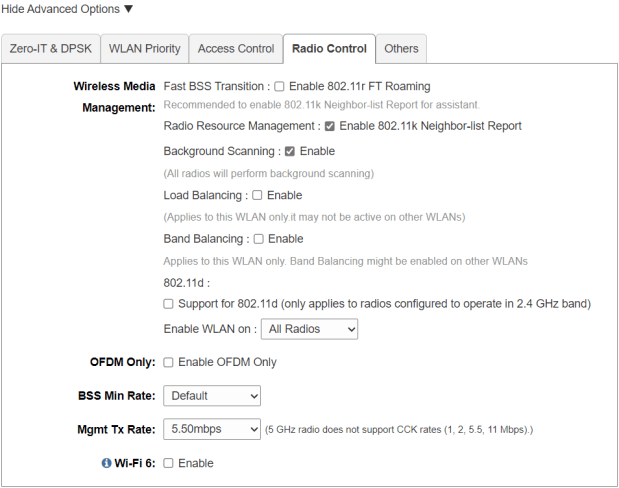
My original version of this post I put together over a year ago. I was having issues with a 4 AP Ruckus Unleashed network I have in my house. I thought the issue came from 1 of the access points (APs) being WiFi 6(AX), and the rest being WiFi 5(AC); I wrote the post about disabling WiFi 6 on the 1 AP, then wanted to see if my issue were resolved over the next week. It was not. The issue was mostly around Apple devices refusing to roam. You can walk far away from 1 AP, and towards another, and you wouldn’t roam for a LONG time without manually disabling and enabling WiFi.

After more digging, and seeing people online chat, I was pointed to an Apple post (which has since disappeared) saying to move your “WiFi DTIM to 3”. DTIM (delivery traffic indication message) handles how often an access point echos out information about itself.

Changing this setting has seemed to make roaming on Ruckus work much better. Ironically, or not, this is one of those settings network engineers argue about. Here is a different Apple support post saying it HAS to be 1. Cisco, says the value should always be a 1 or a 2. Hopefully this info helps someone else if they are having issues, give it a try.

Bypassing “Press Enter for network boot service”

Recently I have been working on some Microsoft SCCM automations. One issue I ran into was when UEFI booting into SCCM I got “Press Enter for network boot service”. Some people said you cant bypass it, others said maybe make it required update. Microsoft’s forums said its part of the firmware, they couldn’t control it; we know that’s wrong, because Linux network boots don’t have this issue and the prompt comes from their efi file.

I wanted to give a quick fix for people who run into this: upgrade your Windows ADK and WinPE to Windows 11. From my readings, Windows 8 ADK didn’t do this button press requirement, and I thought, I would try the newer ADK for Windows 11 instead of Windows 10 version 2004 (or earlier). The second I installed that Windows ADK and restarted, all of a sudden that prompt was gone. Happy booting!

VMWare EAM Failing, and not Allowing Upgrades

I was attempting to upgrade my homelab which I pushed to VMWare vSphere 8.0 because of… YOLO… and after a recent 8.0.1 update I was no longer able to upgrade individual ESXi hosts. I had already updated vCenter to the latest version, now I wanted to upgrade the hosts. That is my normal course of action, vCenter, then hosts; as recommended. When I went to upgrade the hosts I was told:

"Health check fails to retrieve data about service 'vSphere ESX Agent Manager' on '3 Node And Friends'. Verify that the service 'vSphere ESX Agent Manager' is running and try again."

This had me SSH into the appliance and looking at logs. (To quickly mention EAM = “vSphere ESX Agent Manager“) Here are some of the fun errors I was getting in “/var/vmware/eam/eam.log”:

  • “Re-login to vCenter because method: currentTime of managed object: null::ServiceInstance:ServiceInstance failed due to expired client session: null”
  • “failed to authenticate extension com.vmware.vim.eam to vCenter”

Some older guides mentioned unregistering EAM and then re-registering it. This broke my install even worse, and I ended up reverting to a snapshot. (Always snapshot before upgrades…) When I reverted back to before the vCenter upgrade, I realized that EAM was actually failing before the vCenter upgrade; except now I had EAM back in my extension list both on https://vcenter/mob/?moid=ExtensionManager and in vCenter, which was missing after I followed the guide saying to un-register it.

Now that I had the plugin registered, again, I found this KB, and this persons blog very helpful. I ran the recommended commands:

mkdir /certificate

/usr/lib/vmware-vmafd/bin/vecs-cli entry getcert --store vpxd-extension --alias vpxd-extension --output /certificate/vpxd-extension.crt

/usr/lib/vmware-vmafd/bin/vecs-cli entry getkey --store vpxd-extension --alias vpxd-extension --output /certificate/vpxd-extension.key

python /usr/lib/vmware-vpx/scripts/updateExtensionCertInVC.py -e com.vmware.vim.eam -c /certificate/vpxd-extension.crt -k /certificate/vpxd-extension.key -s vcenter.my.domain -u Administrator@vsphere.local

And then EAM suddenly showed happy, and the log started showing useful things:

2023-06-06T16:53:37.573Z |  INFO | vim-monitor | ExtensionSessionRenewer.java | 190 | [Retry:Login:com.vmware.vim.eam:f86509907b4cb7c6] Re-login to vCenter b
ecause method: currentTime of managed object: null::ServiceInstance:ServiceInstance failed due to expired client session: null
2023-06-06T16:53:37.573Z |  INFO | vim-monitor | OpId.java | 37 | [vim:loginExtensionByCertificate:443bbd7c03dce9c6] created from [Retry:Login:com.vmware.vim
.eam:f86509907b4cb7c6]
2023-06-06T16:53:37.947Z |  INFO | vim-async-2 | OpIdLogger.java | 35 | [vim:loginExtensionByCertificate:443bbd7c03dce9c6] Completed.

Thats it! Now I can run updates again! If anyone has the same issue, drop a line in the comments. I hope this isn’t a big new vSphere 8.0 issue. I had upgraded this appliance from 7.0, and perhaps that or a cert issue caused issues.

Below is some of my eam.log to help people:

2023-06-06T02:20:29.728Z | ERROR | vlsi | DispatcherImpl.java | 468 | Internal server error during dispatch
com.vmware.vim.binding.eam.fault.EamServiceNotInitialized: EAM is still loading from database. Please try again later.
        at com.vmware.eam.vmomi.EAMInitRequestFilter.handleBody(EAMInitRequestFilter.java:57) ~[eam-server.jar:?]
        at com.vmware.vim.vmomi.server.impl.DispatcherImpl$SingleRequestDispatcher.handleBody(DispatcherImpl.java:373) [vlsi-server.jar:?]
        at com.vmware.vim.vmomi.server.impl.DispatcherImpl$SingleRequestDispatcher.dispatch(DispatcherImpl.java:290) [vlsi-server.jar:?]
        at com.vmware.vim.vmomi.server.impl.DispatcherImpl.dispatch(DispatcherImpl.java:246) [vlsi-server.jar:?]
        at com.vmware.vim.vmomi.server.http.impl.CorrelationDispatcherTask.run(CorrelationDispatcherTask.java:58) [vlsi-server.jar:?]
        at java.util.concurrent.ThreadPoolExecutor.runWorker(ThreadPoolExecutor.java:1149) [?:1.8.0_362]
        at java.util.concurrent.ThreadPoolExecutor$Worker.run(ThreadPoolExecutor.java:624) [?:1.8.0_362]
        at java.lang.Thread.run(Thread.java:750) [?:1.8.0_362]
2023-06-06T02:20:31.769Z |  INFO | vim-monitor | ExtensionSessionRenewer.java | 190 | [Retry:Login:com.vmware.vim.eam:9ae94019eb8cb9a2] Re-login to vCenter b
ecause method: currentTime of managed object: null::ServiceInstance:ServiceInstance failed due to expired client session: null
2023-06-06T02:20:31.769Z |  INFO | vim-monitor | OpId.java | 37 | [vim:loginExtensionByCertificate:b63ca4cf0b995a54] created from [Retry:Login:com.vmware.vim
.eam:9ae94019eb8cb9a2]
2023-06-06T02:20:34.775Z |  INFO | vim-async-2 | OpIdLogger.java | 43 | [vim:loginExtensionByCertificate:b63ca4cf0b995a54] Failed.
2023-06-06T02:20:34.775Z |  WARN | vim-async-2 | ExtensionSessionRenewer.java | 227 | [Retry:Login:com.vmware.vim.eam:9ae94019eb8cb9a2] Re-login failed, due
to:
com.vmware.eam.security.NotAuthenticated: Failed to authenticate extension com.vmware.vim.eam to vCenter.
        at com.vmware.eam.vim.security.impl.SessionManager.convertLoginException(SessionManager.java:329) ~[eam-server.jar:?]
        at com.vmware.eam.vim.security.impl.SessionManager.lambda$loginExtension$4(SessionManager.java:154) ~[eam-server.jar:?]
        at com.vmware.eam.async.remote.Completion.onError(Completion.java:86) [eam-server.jar:?]
        at com.vmware.eam.vmomi.async.FutureAdapter.setException(FutureAdapter.java:81) [eam-server.jar:?]
        at com.vmware.vim.vmomi.client.common.impl.MethodInvocationHandlerImpl$ClientFutureAdapter.setException(MethodInvocationHandlerImpl.java:731) [vlsi-c
lient.jar:?]
        at com.vmware.vim.vmomi.client.common.impl.MethodInvocationHandlerImpl$RetryingFuture.fail(MethodInvocationHandlerImpl.java:578) [vlsi-client.jar:?]
        at com.vmware.vim.vmomi.client.common.impl.MethodInvocationHandlerImpl$RetryingFuture$RetryActionImpl.proceed(MethodInvocationHandlerImpl.java:625) [
vlsi-client.jar:?]
        at com.vmware.eam.vim.security.impl.ExtensionSessionRenewer.retry(ExtensionSessionRenewer.java:149) [eam-server.jar:?]
        at com.vmware.vim.vmomi.client.common.impl.MethodInvocationHandlerImpl$RetryingFuture.setException(MethodInvocationHandlerImpl.java:541) [vlsi-client
.jar:?]
        at com.vmware.vim.vmomi.client.common.impl.ResponseImpl.setResponse(ResponseImpl.java:239) [vlsi-client.jar:?]
        at com.vmware.vim.vmomi.client.http.impl.HttpExchangeBase.parseResponse(HttpExchangeBase.java:286) [vlsi-client.jar:?]
        at com.vmware.vim.vmomi.client.http.impl.HttpExchange.invokeWithinScope(HttpExchange.java:54) [vlsi-client.jar:?]
        at com.vmware.vim.vmomi.client.http.impl.TracingScopedRunnable.run(TracingScopedRunnable.java:24) [vlsi-client.jar:?]
        at com.vmware.vim.vmomi.client.http.impl.HttpExchangeBase.run(HttpExchangeBase.java:60) [vlsi-client.jar:?]
        at java.util.concurrent.ThreadPoolExecutor.runWorker(ThreadPoolExecutor.java:1149) [?:1.8.0_362]
        at java.util.concurrent.ThreadPoolExecutor$Worker.run(ThreadPoolExecutor.java:624) [?:1.8.0_362]
        at java.lang.Thread.run(Thread.java:750) [?:1.8.0_362]
Caused by: com.vmware.vim.binding.vim.fault.InvalidLogin: Cannot complete login due to an incorrect user name or password.
        at sun.reflect.GeneratedConstructorAccessor58.newInstance(Unknown Source) ~[?:?]
        at sun.reflect.DelegatingConstructorAccessorImpl.newInstance(DelegatingConstructorAccessorImpl.java:45) ~[?:1.8.0_362]
        at java.lang.reflect.Constructor.newInstance(Constructor.java:423) ~[?:1.8.0_362]
        at java.lang.Class.newInstance(Class.java:442) ~[?:1.8.0_362]
        at com.vmware.vim.vmomi.core.types.impl.ComplexTypeImpl.newInstance(ComplexTypeImpl.java:174) ~[vlsi-core.jar:?]
        at com.vmware.vim.vmomi.core.types.impl.DefaultDataObjectFactory.newDataObject(DefaultDataObjectFactory.java:25) ~[vlsi-core.jar:?]
        at com.vmware.vim.vmomi.core.soap.impl.unmarshaller.ComplexStackContext.<init>(ComplexStackContext.java:30) ~[vlsi-core.jar:?]
        at com.vmware.vim.vmomi.core.soap.impl.unmarshaller.UnmarshallerImpl$UnmarshallSoapFaultContext.parse(UnmarshallerImpl.java:167) ~[vlsi-core.jar:?]
        at com.vmware.vim.vmomi.core.soap.impl.unmarshaller.UnmarshallerImpl$UnmarshallSoapFaultContext.unmarshall(UnmarshallerImpl.java:105) ~[vlsi-core.jar
:?]
        at com.vmware.vim.vmomi.core.soap.impl.unmarshaller.UnmarshallerImpl.unmarshalSoapFault(UnmarshallerImpl.java:92) ~[vlsi-core.jar:?]
        at com.vmware.vim.vmomi.core.soap.impl.unmarshaller.UnmarshallerImpl.unmarshalSoapFault(UnmarshallerImpl.java:86) ~[vlsi-core.jar:?]
        at com.vmware.vim.vmomi.client.common.impl.SoapFaultStackContext.setValue(SoapFaultStackContext.java:41) ~[vlsi-client.jar:?]
        at com.vmware.vim.vmomi.client.common.impl.ResponseUnmarshaller.processNextElement(ResponseUnmarshaller.java:127) ~[vlsi-client.jar:?]
        at com.vmware.vim.vmomi.client.common.impl.ResponseUnmarshaller.unmarshal(ResponseUnmarshaller.java:70) ~[vlsi-client.jar:?]
        at com.vmware.vim.vmomi.client.common.impl.ResponseImpl.unmarshalResponse(ResponseImpl.java:284) ~[vlsi-client.jar:?]
        at com.vmware.vim.vmomi.client.common.impl.ResponseImpl.setResponse(ResponseImpl.java:241) ~[vlsi-client.jar:?]
        ... 7 more
2023-06-06T02:20:34.777Z | ERROR | vim-monitor | VcListener.java | 124 | An unexpected error in the changes polling loop
com.vmware.eam.EamRemoteSystemException: Unexpected error communicating with the vCenter server.
        at com.vmware.eam.vim.server.impl.VimRoot.rootOperation(VimRoot.java:106) ~[eam-server.jar:?]
        at com.vmware.eam.vim.server.impl.VimRoot.currentTime(VimRoot.java:78) ~[eam-server.jar:?]
        at com.vmware.eam.vc.VcListener.main(VcListener.java:140) ~[eam-server.jar:?]
        at com.vmware.eam.vc.VcListener.call(VcListener.java:118) [eam-server.jar:?]
        at com.vmware.eam.vc.VcListener.call(VcListener.java:58) [eam-server.jar:?]
        at com.vmware.eam.async.impl.AuditedJob.call(AuditedJob.java:58) [eam-server.jar:?]
        at com.vmware.eam.async.impl.FutureRunnable.run(FutureRunnable.java:55) [eam-server.jar:?]
        at java.util.concurrent.ThreadPoolExecutor.runWorker(ThreadPoolExecutor.java:1149) [?:1.8.0_362]
        at java.util.concurrent.ThreadPoolExecutor$Worker.run(ThreadPoolExecutor.java:624) [?:1.8.0_362]
        at java.lang.Thread.run(Thread.java:750) [?:1.8.0_362]
Caused by: com.vmware.vim.binding.vim.fault.NotAuthenticated: The session is not authenticated.
        at sun.reflect.GeneratedConstructorAccessor57.newInstance(Unknown Source) ~[?:?]
        at sun.reflect.DelegatingConstructorAccessorImpl.newInstance(DelegatingConstructorAccessorImpl.java:45) ~[?:1.8.0_362]
        at java.lang.reflect.Constructor.newInstance(Constructor.java:423) ~[?:1.8.0_362]
        at java.lang.Class.newInstance(Class.java:442) ~[?:1.8.0_362]
        at com.vmware.vim.vmomi.core.types.impl.ComplexTypeImpl.newInstance(ComplexTypeImpl.java:174) ~[vlsi-core.jar:?]
        at com.vmware.vim.vmomi.core.types.impl.DefaultDataObjectFactory.newDataObject(DefaultDataObjectFactory.java:25) ~[vlsi-core.jar:?]
        at com.vmware.vim.vmomi.core.soap.impl.unmarshaller.ComplexStackContext.<init>(ComplexStackContext.java:30) ~[vlsi-core.jar:?]
        at com.vmware.vim.vmomi.core.soap.impl.unmarshaller.UnmarshallerImpl$UnmarshallSoapFaultContext.parse(UnmarshallerImpl.java:167) ~[vlsi-core.jar:?]
        at com.vmware.vim.vmomi.core.soap.impl.unmarshaller.UnmarshallerImpl$UnmarshallSoapFaultContext.unmarshall(UnmarshallerImpl.java:105) ~[vlsi-core.jar
:?]
        at com.vmware.vim.vmomi.core.soap.impl.unmarshaller.UnmarshallerImpl.unmarshalSoapFault(UnmarshallerImpl.java:92) ~[vlsi-core.jar:?]
        at com.vmware.vim.vmomi.core.soap.impl.unmarshaller.UnmarshallerImpl.unmarshalSoapFault(UnmarshallerImpl.java:86) ~[vlsi-core.jar:?]
        at com.vmware.vim.vmomi.client.common.impl.SoapFaultStackContext.setValue(SoapFaultStackContext.java:41) ~[vlsi-client.jar:?]
        at com.vmware.vim.vmomi.client.common.impl.ResponseUnmarshaller.processNextElement(ResponseUnmarshaller.java:127) ~[vlsi-client.jar:?]
        at com.vmware.vim.vmomi.client.common.impl.ResponseUnmarshaller.unmarshal(ResponseUnmarshaller.java:70) ~[vlsi-client.jar:?]
        at com.vmware.vim.vmomi.client.common.impl.ResponseImpl.unmarshalResponse(ResponseImpl.java:284) ~[vlsi-client.jar:?]
        at com.vmware.vim.vmomi.client.common.impl.ResponseImpl.setResponse(ResponseImpl.java:241) ~[vlsi-client.jar:?]
        at com.vmware.vim.vmomi.client.http.impl.HttpExchangeBase.parseResponse(HttpExchangeBase.java:286) ~[vlsi-client.jar:?]
        at com.vmware.vim.vmomi.client.http.impl.HttpExchange.invokeWithinScope(HttpExchange.java:54) ~[vlsi-client.jar:?]
        at com.vmware.vim.vmomi.client.http.impl.TracingScopedRunnable.run(TracingScopedRunnable.java:24) ~[vlsi-client.jar:?]
        at com.vmware.vim.vmomi.client.http.impl.HttpExchangeBase.run(HttpExchangeBase.java:60) ~[vlsi-client.jar:?]
        at com.vmware.vim.vmomi.client.http.impl.HttpProtocolBindingBase.executeRunnable(HttpProtocolBindingBase.java:229) ~[vlsi-client.jar:?]
        at com.vmware.vim.vmomi.client.http.impl.HttpProtocolBindingImpl.send(HttpProtocolBindingImpl.java:114) ~[vlsi-client.jar:?]
        at com.vmware.vim.vmomi.client.common.impl.MethodInvocationHandlerImpl$CallExecutor.sendCall(MethodInvocationHandlerImpl.java:693) ~[vlsi-client.jar:
?]
        at com.vmware.vim.vmomi.client.common.impl.MethodInvocationHandlerImpl$CallExecutor.executeCall(MethodInvocationHandlerImpl.java:674) ~[vlsi-client.j
ar:?]
        at com.vmware.vim.vmomi.client.common.impl.MethodInvocationHandlerImpl.completeCall(MethodInvocationHandlerImpl.java:371) ~[vlsi-client.jar:?]
        at com.vmware.vim.vmomi.client.common.impl.MethodInvocationHandlerImpl.invokeOperation(MethodInvocationHandlerImpl.java:322) ~[vlsi-client.jar:?]
        at com.vmware.vim.vmomi.client.common.impl.MethodInvocationHandlerImpl.invoke(MethodInvocationHandlerImpl.java:195) ~[vlsi-client.jar:?]
        at com.sun.proxy.$Proxy51.currentTime(Unknown Source) ~[?:?]
        at com.vmware.eam.vim.server.impl.VimRoot.rootOperation(VimRoot.java:101) ~[eam-server.jar:?]
        ... 9 more
2023-06-06T02:20:34.778Z |  INFO | vim-monitor | VcListener.java | 125 | Full stack trace: com.vmware.eam.EamRemoteSystemException: Unexpected error communic
ating with the vCenter server.
        at com.vmware.eam.vim.server.impl.VimRoot.rootOperation(VimRoot.java:106)
        at com.vmware.eam.vim.server.impl.VimRoot.currentTime(VimRoot.java:78)
        at com.vmware.eam.vc.VcListener.main(VcListener.java:140)
        at com.vmware.eam.vc.VcListener.call(VcListener.java:118)
        at com.vmware.eam.vc.VcListener.call(VcListener.java:58)
        at com.vmware.eam.async.impl.AuditedJob.call(AuditedJob.java:58)
        at com.vmware.eam.async.impl.FutureRunnable.run(FutureRunnable.java:55)
        at java.util.concurrent.ThreadPoolExecutor.runWorker(ThreadPoolExecutor.java:1149)
        at java.util.concurrent.ThreadPoolExecutor$Worker.run(ThreadPoolExecutor.java:624)
        at java.lang.Thread.run(Thread.java:750)
Caused by: (vim.fault.NotAuthenticated) {
   faultCause = null,
   faultMessage = null,
   object = ManagedObjectReference: type = ServiceInstance, value = ServiceInstance, serverGuid = f0ee8343-1721-4676-9069-1a837625c60b,
   privilegeId = ,
   missingPrivileges = null
}
        at sun.reflect.GeneratedConstructorAccessor57.newInstance(Unknown Source)
        at sun.reflect.DelegatingConstructorAccessorImpl.newInstance(DelegatingConstructorAccessorImpl.java:45)
        at java.lang.reflect.Constructor.newInstance(Constructor.java:423)
        at java.lang.Class.newInstance(Class.java:442)
        at com.vmware.vim.vmomi.core.types.impl.ComplexTypeImpl.newInstance(ComplexTypeImpl.java:174)
        at com.vmware.vim.vmomi.core.types.impl.DefaultDataObjectFactory.newDataObject(DefaultDataObjectFactory.java:25)
        at com.vmware.vim.vmomi.core.soap.impl.unmarshaller.ComplexStackContext.<init>(ComplexStackContext.java:30)
        at com.vmware.vim.vmomi.core.soap.impl.unmarshaller.UnmarshallerImpl$UnmarshallSoapFaultContext.parse(UnmarshallerImpl.java:167)
        at com.vmware.vim.vmomi.core.soap.impl.unmarshaller.UnmarshallerImpl$UnmarshallSoapFaultContext.unmarshall(UnmarshallerImpl.java:105)
        at com.vmware.vim.vmomi.core.soap.impl.unmarshaller.UnmarshallerImpl.unmarshalSoapFault(UnmarshallerImpl.java:92)
        at com.vmware.vim.vmomi.core.soap.impl.unmarshaller.UnmarshallerImpl.unmarshalSoapFault(UnmarshallerImpl.java:86)
        at com.vmware.vim.vmomi.client.common.impl.SoapFaultStackContext.setValue(SoapFaultStackContext.java:41)
        at com.vmware.vim.vmomi.client.common.impl.ResponseUnmarshaller.processNextElement(ResponseUnmarshaller.java:127)
        at com.vmware.vim.vmomi.client.common.impl.ResponseUnmarshaller.unmarshal(ResponseUnmarshaller.java:70)
        at com.vmware.vim.vmomi.client.common.impl.ResponseImpl.unmarshalResponse(ResponseImpl.java:284)
        at com.vmware.vim.vmomi.client.common.impl.ResponseImpl.setResponse(ResponseImpl.java:241)
        at com.vmware.vim.vmomi.client.http.impl.HttpExchangeBase.parseResponse(HttpExchangeBase.java:286)
        at com.vmware.vim.vmomi.client.http.impl.HttpExchange.invokeWithinScope(HttpExchange.java:54)
        at com.vmware.vim.vmomi.client.http.impl.TracingScopedRunnable.run(TracingScopedRunnable.java:24)
        at com.vmware.vim.vmomi.client.http.impl.HttpExchangeBase.run(HttpExchangeBase.java:60)
        at com.vmware.vim.vmomi.client.http.impl.HttpProtocolBindingBase.executeRunnable(HttpProtocolBindingBase.java:229)
        at com.vmware.vim.vmomi.client.http.impl.HttpProtocolBindingImpl.send(HttpProtocolBindingImpl.java:114)
        at com.vmware.vim.vmomi.client.common.impl.MethodInvocationHandlerImpl$CallExecutor.sendCall(MethodInvocationHandlerImpl.java:693)
        at com.vmware.vim.vmomi.client.common.impl.MethodInvocationHandlerImpl$CallExecutor.executeCall(MethodInvocationHandlerImpl.java:674)
        at com.vmware.vim.vmomi.client.common.impl.MethodInvocationHandlerImpl.completeCall(MethodInvocationHandlerImpl.java:371)
        at com.vmware.vim.vmomi.client.common.impl.MethodInvocationHandlerImpl.invokeOperation(MethodInvocationHandlerImpl.java:322)
        at com.vmware.vim.vmomi.client.common.impl.MethodInvocationHandlerImpl.invoke(MethodInvocationHandlerImpl.java:195)
        at com.sun.proxy.$Proxy51.currentTime(Unknown Source)
        at com.vmware.eam.vim.server.impl.VimRoot.rootOperation(VimRoot.java:101)
        ... 9 more

2023-06-06T02:20:34.778Z |  INFO | vim-monitor | VcListener.java | 131 | Retrying in 10 sec.

Adding Content Security Policy (CSP) Support to Embedded Tomcat 10

Continuing the series of hardening embedded Tomcat in Java to meet Nessus security scans, I am back with an example of adding a Content Security Policy to your app. There are some ways in a more standard Tomcat server to provide CSP policies, but with an embedded server that can be more difficult.

I have used an embedded Tomcat server for years to build applications. The following example is using Tomcat 10, but the principle is the same or Tomcat 9. The main difference as a Tomcat 9 to 10 transition is moving from the javax namespace to jakarta. With more and more libraries, such as Jooq, moving to more modern Java versions; as well as, some of the new Java versions offering good performance improvements out of the box, it may be time for everyone to move to the Jakarta namespace. (Even if that means leaving some libraries such as Google OAuth behind)

In my recent example project going over how to use Pac4J for Oauth with Tomcat 10, I have added an example here of what the FilterBase class would look like. You then need to initialize the filter where you are starting the Tomcat thread. That will add the needed header to all the web requests your application processes.

Missing Email Alerts from LibreNMS

I realized recently that I haven’t gotten any alerts from LibreNMS recently, including when I rebooted devices for patching. After going to the “Alert Transport”, and attempting to send a message I got “SNMP Error: Could not authenticate.” Others seem to recently get this as well. (Link)

Turns out after May 31st (although for me it seems more like June 6th, 2022) Google disabled simple password logins for Gmail accounts. You need to enable two factor auth, then enable an app specific password for LibreNMS. This was a good quick guide on how to do that. With LibreNMS sending alerts when something is wrong, but not having a alert that it is working, it may be worth going and checking if you use LibreNMS and Gmail.

Cisco ISE 2.X Certificate Expiration

Quick post: I had a HA pair of ISE boxes in a lab the other day have the certificates that I made with a Windows Certificate Authority expire the other day and I ran into some odd behavior. To be clear, in this scenario, the certificates had a valid chain of trust, but it was past its expiration date.

I logged in after realizing this and had odd behavior, node-A could not read node-Bs certificates. Both nodes said they were no longer on domain, even though the domain disagreed and I logged in with domain credentials that were recently changed. Then when I went to make a Certificate Signing Request (CSR), I was able to make it, but when I went to download it I got a generic message of “Cannot connect to node-a”. At the same time all these issues were going on, under “Node Status” on the dashboard, both nodes were sharing health data.

In the end, ISE gets weird when the cert date has expired. I generated a new self signed cert for node-A. Then deleted the expired certs because the system didnt want me to make a CSR for the same thing it thought it had a cert for already. This allowed me to then properly make a CSR and export it. That gave me “ciscoisenodea.pem”, I brought that over to my setup Windows CA, and with a admin command prompt ran certreq -submit -attrib "CertificateTemplate:WebServer" ciscoisenodea.pem . Saved that to my local desktop, and went into ISE to Bind it to the CSR. Node-A then rebooted. All of a sudden things like the domain pairing, started showing they were working again. Then the second node, I did the same process, and all of a sudden everything was happy again. Note: make sure you have a your admin backup password, one of the nodes DID refuse to talk to AD and I had to use that, while the other one said it wasn’t on the domain, but did work…

Hope this helps someone out there!

Systemctl: Assignment outside of section. Ignoring.

I wanted to throw together a quick post for a recent issue I have seen on Redhat 7/CentOS 7 boxes. A recent OS update has brought a small but important change to SystemD. In the past if you wanted to add environment variables to a SystemD service, you could enter # systemctl edit postgresql-14 (note I will be using postgresql-14 as the example service in this post), then add a line such as:

Environment=PGDATA=/opt/postgres/14/data/

After saving the file, and starting the service you are good to go. Recently after a minor update, I started getting the error “[/etc/systemd/system/postgresql-14.service.d/override.conf:1] Assignment outside of section. Ignoring.”, then the service would not start. It turns out, you can no longer drop Environment lines directly into the SystemD overrides, you need to mark which section of the SystemD file you are overriding. Below is the new proper way to go about this:

[Service]
Environment=PGDATA=/opt/postgres/14/data/

Quick fix, but can take a bit of digging. Also for SystemD and Postgres 14, this is the current way to easily redirect the data folder. Hope this helps someone!